The script node runs a small piece of code you write as a step in your pipeline. It reads the media item and the outputs of any nodes upstream of it, and produces whatever outputs you declare — a text, a number, a list of texts, a block of JSON, a set of timeframes, or images.
It exists for the gap between "one of the built-in nodes already does this" and "we need a new node built and released". Turning a transcript into chapter marks, thresholding a quality metric into a tag, reshaping a language model’s answer into structured fields — each is a few lines of code, and each would otherwise be a development project.
Kind |
|
Applies to |
Any asset |
Input ports |
|
Output ports |
Whatever you declare — see Declaring outputs. A list type becomes a many port |
Languages |
JavaScript |
Requirements |
None. The script runs inside the Cortex worker; no external service is involved |
Persists to |
|
Writing a script
The script runs once per media item. Six values are available to it:
| Name | What it gives you |
|---|---|
|
The current item: |
|
What arrived on the connected inputs. The |
|
The constants you set in the node’s Parameters field, so one script can be reused with different settings |
|
How you produce results — |
|
|
|
|
A complete example — turning a transcript into chapter marks. Connect the whisper node’s
transcript output to this node’s text input, and it arrives as data.text:
const re = new RegExp(params.pattern, 'i');
const transcript = JSON.parse(data.text);

const frames = transcript.segments
  .filter(s => re.test(s.text))
  .map(s => ({ startMs: Math.round(s.start * 1000),
               endMs:   Math.round(s.end   * 1000),
               label:   s.text.trim() }));

if (frames.length === 0) {
  ctx.skip('no chapter markers in transcript');
}

out.timeframes('chapter_frames', frames);
out.list('chapter_titles', frames.map(f => f.label));
out.integer('chapter_count', frames.length);
Declaring outputs
Outputs are declared in the node’s Outputs field, not discovered from the script. This is what lets the pipeline editor draw the node’s output ports — with their types and their cardinality — so you can wire the next node to them before the script has ever run.
[
  { "key": "chapter_frames", "type": "TIMEFRAMES" },
  { "key": "chapter_titles", "type": "TEXT_LIST" },
  { "key": "chapter_count",  "type": "INTEGER" }
]| Type | The script provides | Stored as |
|---|---|---|
|
a string |
a field in the node’s JSON result |
|
a number |
a field in the node’s JSON result |
|
|
a field in the node’s JSON result |
|
an object |
a field in the node’s JSON result |
|
an array of strings |
a field in the node’s JSON result. The port is many — one element per string |
|
an array of |
a real timeline on the asset. The port is one: the timeline is a single value, however many segments it holds |
|
image bytes, base64, or a path |
an image file in the worker’s cache |
|
an array of those |
one image file each. The port is many — one element per image |
|
a file path |
a field in the node’s JSON result |
The list types are the pipeline’s fan-out: a many port hands the next node one element at a time,
so a script that emits ten titles runs whatever you connect ten times, without you writing a loop.
Every other type is a single value, TIMEFRAMES included — a timeline is one thing, not a sequence
of segments.
A single item can produce several multi-valued outputs at once — that is how one transcript becomes a whole timeline of chapter marks plus a list of titles plus a count, in one pass.
Writing to a key you have not declared stops the node with an error naming the key. That is deliberate: a typo that was silently dropped would leave your pipeline claiming a connection carries data that never arrives.
Timeframes are stored as a real timeline against the asset, so they can be queried and displayed
rather than sitting in an opaque blob. Each timeframe output is filed under a segment type —
CHAPTER (the default), SCENE, SILENCE or SHOT. Set it with "segmentType": "SCENE" alongside
the key and type. If one node declares two timeframe outputs, give them different segment types.
Images are written to the worker that ran the script, and the port carries them as artifacts, which is what lets you connect them straight to S3 Sink. Because the files are local to that worker, keep the nodes that consume them in the same affinity group.
Configuration

| Option | Meaning |
|---|---|
|
The script language. |
|
The script body, run once per media item |
|
The declared outputs — see Declaring outputs |
|
Constants handed to the script as |
|
Connected inputs that must all carry a value, or the item is skipped rather than failed |
|
Whether the script runs with the worker’s full privileges (default) — see Safety and performance |
|
Extra capabilities, off by default |
|
How long one item may take before the script is stopped (default 10 s) |
|
A second guard against a script that loops forever |
|
Cap on the size of a single item’s results (default 1 MB) |
|
Cap on |
Required Inputs is what makes a script safe to hang off an optional branch: if an OCR node only
runs for images, a script downstream of it skips videos quietly instead of reporting a failure for
every one.
Safety and performance
Anyone who can edit a pipeline can run code on a worker. A script node is not a sandboxed plugin by default — treat permission to edit pipelines as equivalent to permission to run code, and grant it accordingly.
Three controls are available:
-
Trusted off. Turning off Trusted denies the script access to the host system: no Java classes, no files, no network, no threads. Use it for scripts that only need to reshape data.
-
Limits. The timeout and statement limit always apply, in both modes. A script that loops forever is stopped and the item recorded as failed; it cannot occupy a worker indefinitely.
-
Turning the node off entirely. Adding
scriptto a worker’s node blacklist means that worker will refuse script work. If no worker accepts it, pipelines containing a script node are rejected when you try to run them, with a clear message — see Cortex Configuration.
On performance: scripts are interpreted, which is ample for shaping data and wrong for heavy per-pixel or per-frame computation. If you find yourself writing a tight loop over image data, that is the signal to build a proper node instead.
Use cases
-
Derive a timeline — turn a transcript, a caption set or a detection list into chapter marks.
-
Classify on a threshold — convert a quality metric or a sentiment score into a simple label.
-
Reshape model output — pull structured fields out of a language model’s free-text answer.
-
Bridge two nodes — rename, filter or combine upstream outputs so the next node gets what it expects.
-
Prototype — try out a processing idea in a live pipeline before committing to building a node for it.
Seeing it run
Turn on Debug Mode and every node keeps what it produced, on the
card itself. Below is a real run of this node over pexels-jack-sparrow-5977265.mp4.
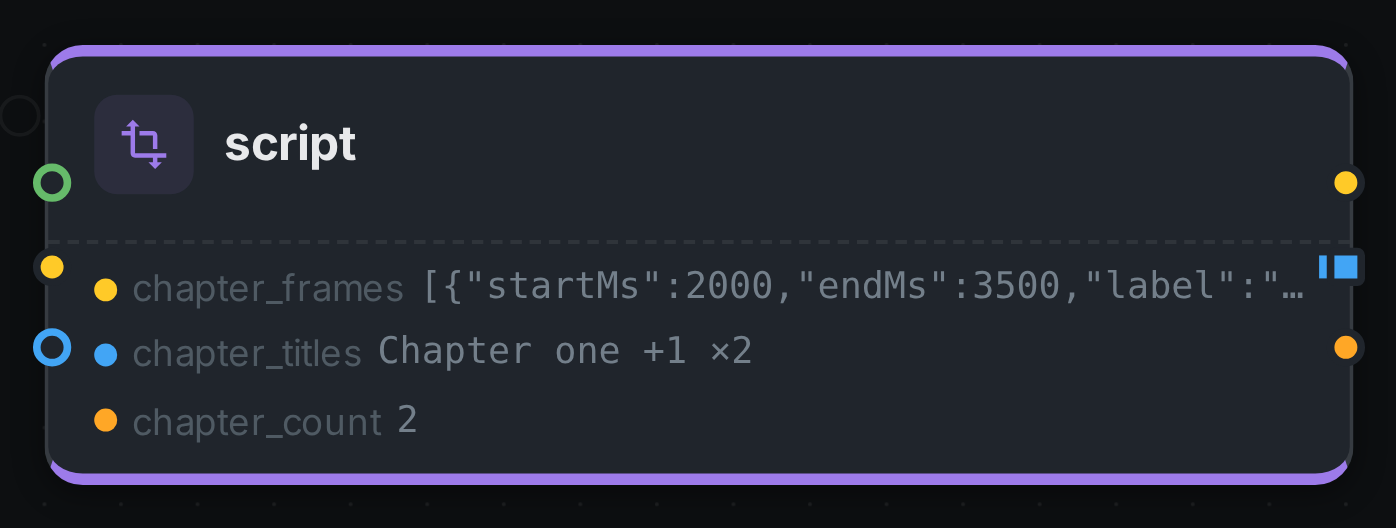
The strip on the card lists what each output port carried — chapter_frames, chapter_titles, chapter_count.