The S3 source is a source node — the entry point of a pipeline. Instead of processing a media item, it enumerates objects from S3-compatible object storage (AWS S3, MinIO, Ceph) and feeds each one into the graph.
It is differential: a small local index remembers what each bucket looked like on the previous run, so a re-run picks up only what is new or changed. Pointing a pipeline at a bucket of a million objects and running it every hour therefore costs almost nothing after the first pass.
Kind |
|
Applies to |
— (source node; produces the media stream) |
Input ports |
None — it is the root of the DAG |
Output ports |
|
Requirements |
CPU only, plus S3 credentials on the worker. No shared media mount is needed. |
Persists to |
n/a (source) |
No shared storage required
Unlike the filesystem source, this node does not need every worker to see the same mount. It
emits object references (s3://bucket/key) rather than file paths, and each worker downloads the
objects it is asked to process into its own local cache. A pipeline can therefore be spread across
machines that share nothing but access to the bucket.
Because the download is what a worker does when it actually needs the bytes, enumerating a bucket transfers no media at all — only object listings.
|
Tip
|
Every worker that processes S3 media needs the S3 settings, not just the one running the source node. A worker that only computes hashes still has to fetch the objects it hashes. |
Picking up only new objects
Three strategies, which can be combined:
| Strategy | How it works | When to use it |
|---|---|---|
Differential scan (default) |
Lists the bucket and compares it against the local index. Listing returns metadata only, so this is fast and transfers no media. |
Always on. This is the strategy that is guaranteed to be correct. |
Bucket notifications ( |
The bucket tells the worker which objects changed, so a run processes just those and skips listing entirely. |
Very large buckets, or when you want runs to be near-instant. |
Resume from last key ( |
Continues listing after the highest key seen so far. |
Only for buckets whose keys are added in ascending order (e.g. date-prefixed) and never edited afterwards. |
Notifications can be lost in transit, and resuming cannot see edits to older keys. Both are therefore treated as accelerators: a full listing still runs periodically (every six hours by default) so that nothing stays invisible.
Enabling bucket notifications
Turn events on for the worker, then point the bucket at it. With MinIO:
mc admin config set myminio notify_webhook:cortex \
    endpoint="http://cortex:8093/s3-events" auth_token="<shared-secret>"
mc admin service restart myminio
mc event add myminio/media arn:minio:sqs::cortex:webhook --event put,delete
On AWS, send the bucket’s notifications to an SQS queue and give the worker the queue URL instead.
Configuration
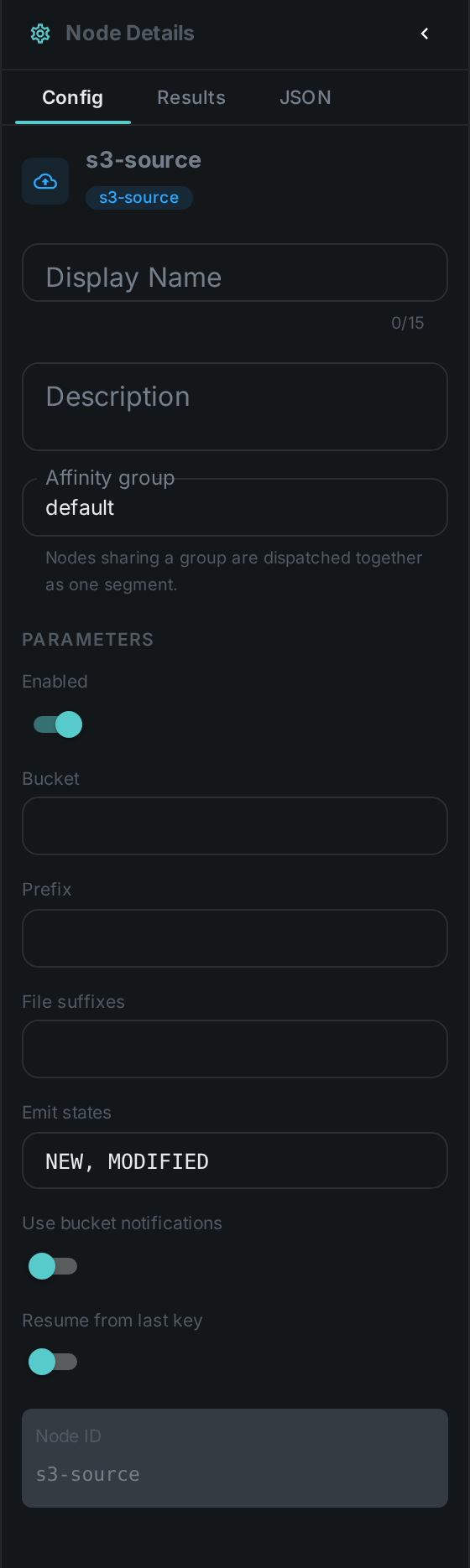
Set on the node in the pipeline editor:
| Option | Meaning |
|---|---|
|
Bucket to read from |
|
Key prefix to limit the scan, e.g. |
|
Comma-separated file suffixes to accept, e.g. |
|
Which changes flow downstream: |
|
Process only the objects the bucket reported as changed, instead of listing it |
|
Continue listing after the highest key seen so far |
Connection settings are configured on the worker, not on the node, so that credentials are never stored in a pipeline definition:
| Setting | Meaning |
|---|---|
|
Endpoint override, e.g. |
|
Region |
|
Credentials. When unset, the standard AWS credential sources are used (environment, profile, instance role) |
|
Path-style addressing. Defaults to on whenever an endpoint is set, which is what MinIO needs |
|
Where downloaded objects are cached |
|
Size budget for that cache; the oldest entries are removed past it |
|
Largest object to download. |
|
How long the fast strategies may be trusted before a full listing is forced |
|
Accept bucket notifications |
|
Shared secret the bucket must send with each notification |
|
SQS queue URL, when notifications arrive that way instead |
A worker with no S3 settings simply does not offer the S3 source, and is never asked to run one.
Seeing it run
Turn on Debug Mode and every node keeps what it produced, on the
card itself. Below is a real run of this node over pexels-jack-sparrow-5977265.mp4.
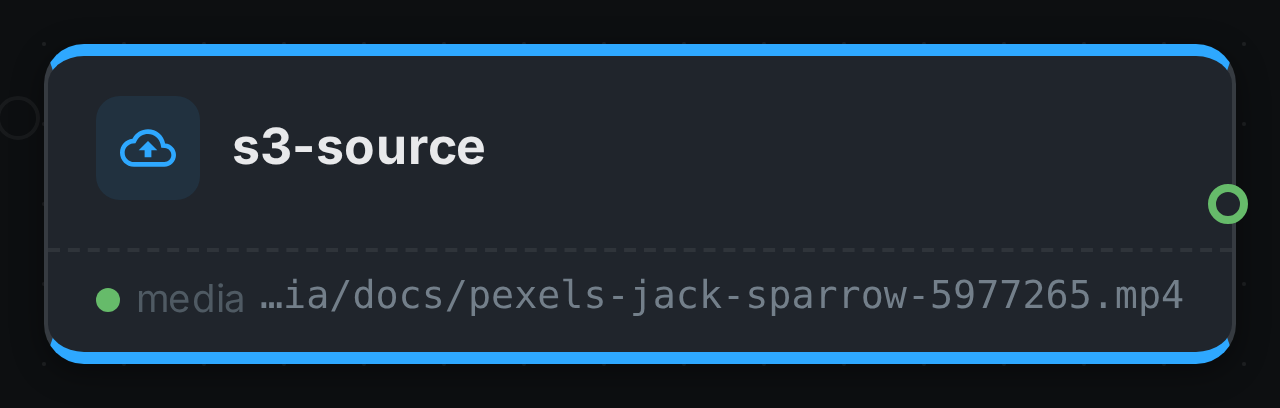
The strip on the card lists what each output port carried — media.
Use Cases
-
Cloud archive ingest — process a media bucket without copying it to a shared filesystem first.
-
Continuous ingest — pick up newly uploaded objects on a schedule, without rescanning history.
-
Distributed processing — spread heavy work across machines that share no storage.